
What Happens When You Enter a URL into a Browser
Unraveling the Behind-the-Scenes Journey from URL to Webpage
When you enter a URL into your browser, it initiates a complex series of operations. This process, which transforms a URL into a webpage, involves a coordinated interaction of various web protocols and systems. In my early backend development interviews, this topic was often highlighted, emphasizing its importance in understanding web functionalities. Let's delve into each step of this process in detail, exploring the technical intricacies involved from the moment a URL is entered to when a webpage is displayed.
The Anatomy of a URL
Embarking on the journey of web navigation begins with the simple act of typing a URL, which stands for Universal Resource Locator, into your browser. This deceptively simple line of text is a meticulously structured address that directs your browser exactly where to go and what to fetch from the internet.
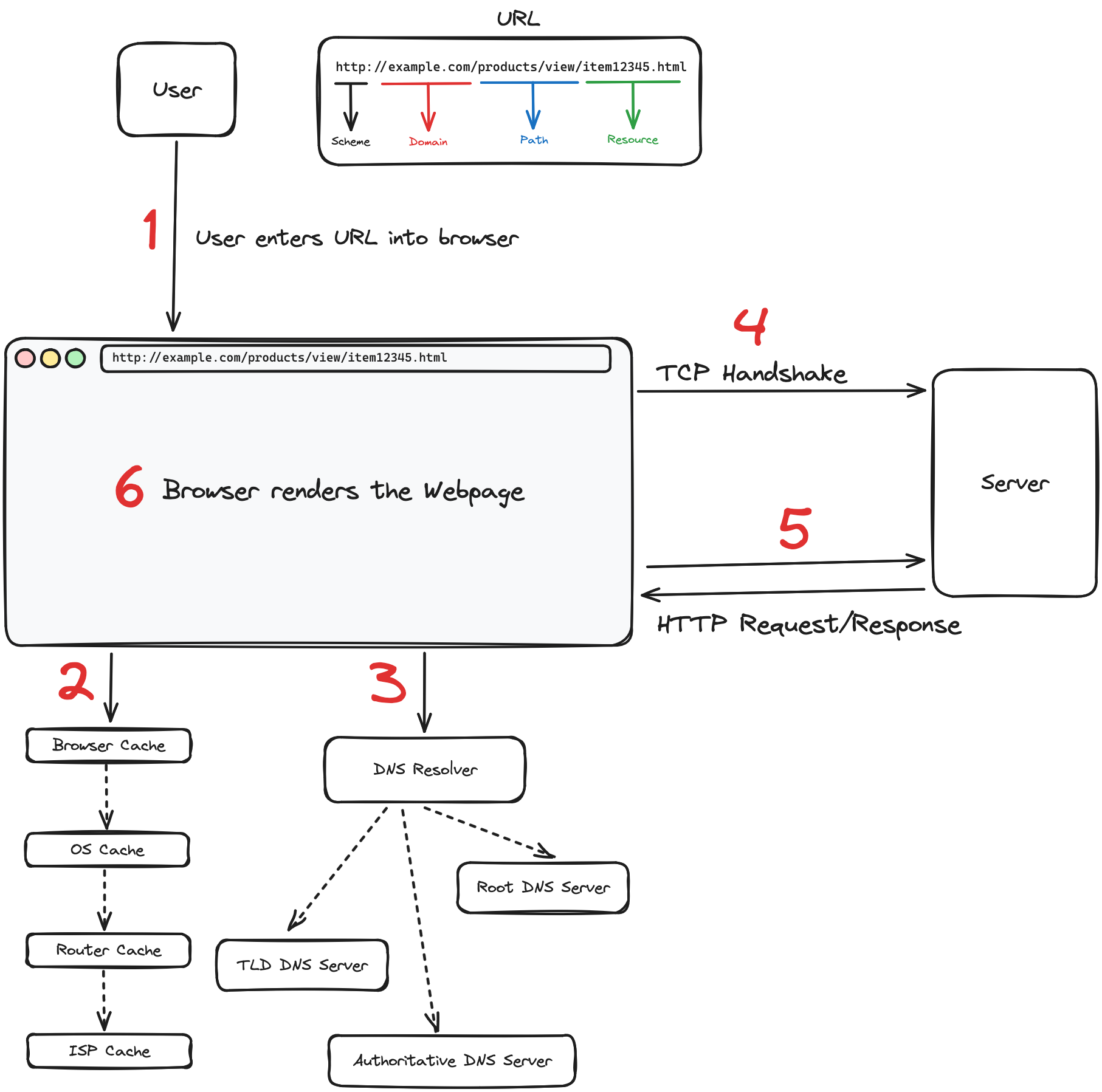
Let's dissect the URL http://example.com/products/view/item12345.html to understand its structure better:
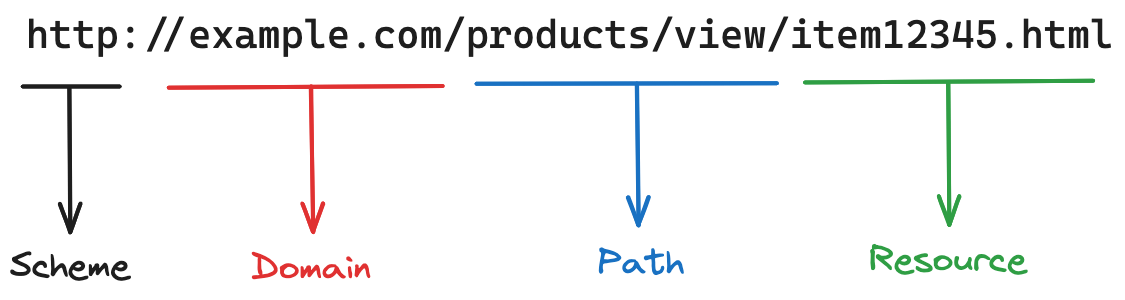
- Scheme: Starting with
http://, the scheme specifies the protocol the browser uses to access the resource. It tells the browser to establish a connection using HTTP (Hypertext Transfer Protocol). If it werehttps://, it would secure the connection with HTTPS, encrypting the data for secure transmission. - Domain: Following the protocol is the domain,
example.comin our example. This part identifies the web server that hosts the content. It's like the address of the building in the vast city of the web where the resource lives. - Path: The path,
/products/view/here, functions similarly to the directory structure on your computer. It navigates through the server's resources to direct the browser to the right corridor where the requested content is located. - Resource: Finally,
item12345.htmlis the specific resource. This part of the URL specifies the actual file name or page that the browser requests from the server. In this case, it's an HTML document, but it could just as easily point to a PDF, a JPEG image, or any other type of file hosted on the server.
Understanding the anatomy of a URL is crucial because it not only helps users to navigate the web efficiently but also provides developers with a framework for organizing and naming their content in a way that is accessible and intuitive.
Resolving the Address: The DNS Resolution Process
When you enter a URL such as http://example.com/products/view/item12345.html into your browser, the first task is to resolve the domain name example.com to an IP address through the Domain Name System (DNS).
Local Caching and Efficiency:
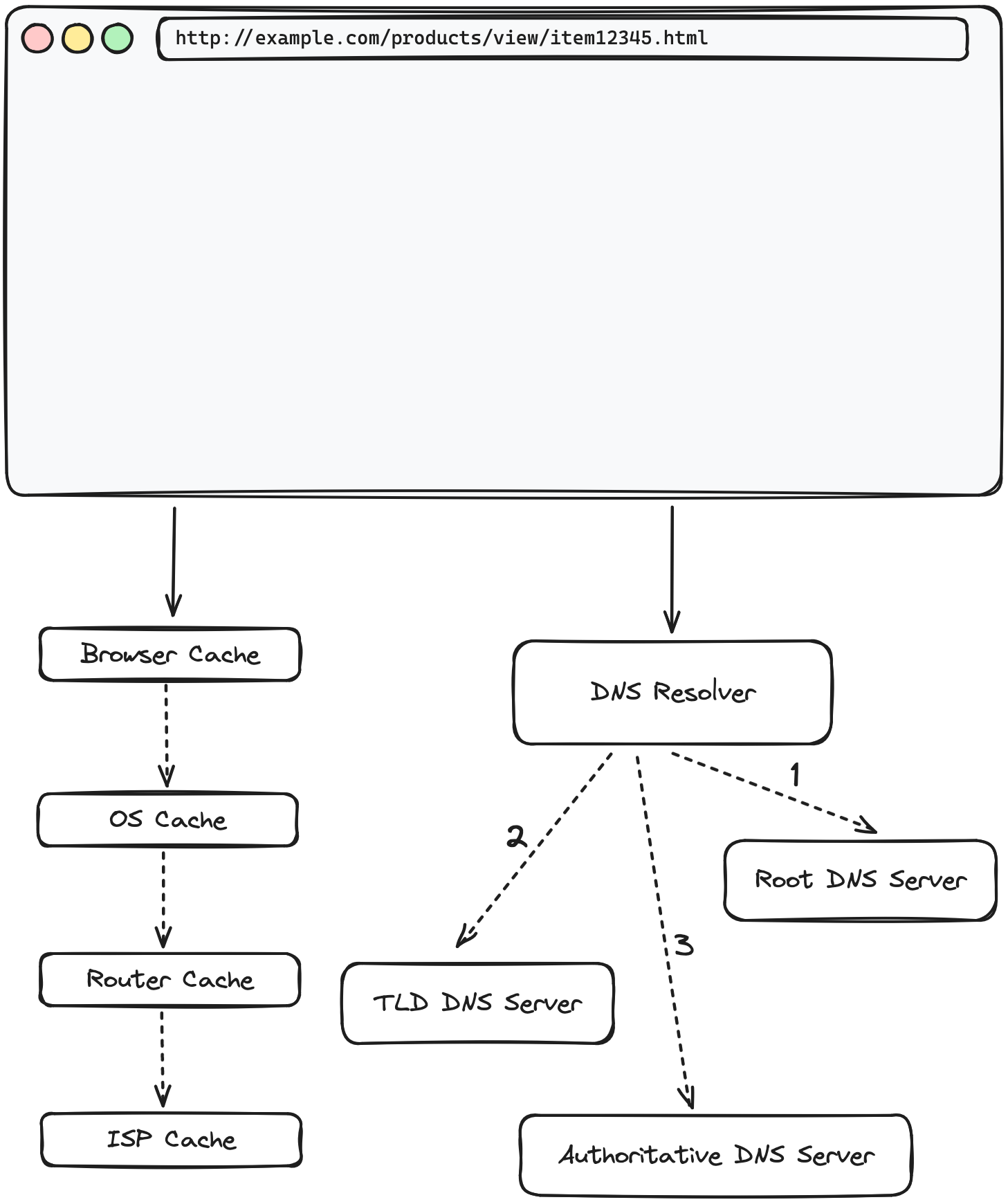
- Browser Cache: The browser first checks its own cache to see if the IP address for
example.comis stored from any recent visits. - Operating System Cache: If not found in the browser cache, it then checks the operating system's cache.
- Router and ISP Cache: Failing to find the address in the local caches, the browser may check further caches, such as those maintained by the router or the Internet Service Provider (ISP).
These caching mechanisms are designed to expedite the resolution process by using previously obtained IP addresses.
Querying the Recursive DNS Resolver:
- If the IP address is not in any of the local caches, the operating system queries a recursive DNS resolver, which is configured in the network settings and often provided by the ISP or a third-party service.
- The recursive resolver is tasked with the DNS lookup, conducting iterative queries if necessary, starting with root DNS servers and moving down the hierarchy as follows:
- Root DNS Server: Provides a pointer to the relevant TLD server for domains ending in
.com. - TLD DNS Server: Directs the resolver to the authoritative DNS server that contains the exact IP address for
example.com. - Authoritative DNS Server: Holds the DNS records for
example.comand provides the IP address to the recursive resolver.
- Root DNS Server: Provides a pointer to the relevant TLD server for domains ending in
Completion of DNS Resolution:
- The recursive resolver sends the resolved IP address back to the operating system, which passes it on to the browser.
- With the IP address in hand, the browser can now initiate a connection to the web server hosting
example.comand request the resource located at/products/view/item12345.html.
This DNS resolution process allows your browser to efficiently translate the domain name into an IP address, setting the stage for the retrieval and rendering of the desired web page.
Establishing Communication: TCP and TLS Handshakes
After successfully resolving the domain name into an IP address, the next step in the journey of loading a webpage is to establish a reliable connection between the browser and the web server. This is achieved through a protocol known as TCP (Transmission Control Protocol), and it involves a specific sequence called the TCP handshake.
The Three-Step TCP Handshake Process:
- SYN (Synchronize): The process begins with the browser sending a SYN (synchronize) packet to the server. This packet essentially tells the server that the browser wants to establish a connection and starts the process of synchronizing sequence numbers, which are crucial for organizing the data packets that will be exchanged.
- SYN-ACK (Synchronize-Acknowledgment): Upon receiving the SYN packet, the server responds with a SYN-ACK packet. This packet acknowledges the receipt of the SYN packet (hence the ACK) and also contains the server's own SYN request, indicating its readiness to establish the connection.
- ACK (Acknowledgment): The browser, upon receiving the SYN-ACK, sends back an ACK packet. This final step acknowledges the server's response, and with this, the connection is established, ready for data transmission.
Efficiency with Keep-Alive: Modern browsers utilize a strategy known as 'keep-alive' to maintain a persistent connection to the server. This means that once a connection is established, it remains open for a period, allowing for additional requests to be made without the need to perform another handshake. This greatly reduces the overhead and latency, making subsequent requests to the same server more efficient.
In this article, we will not delve into the details of the TLS (Transport Layer Security) handshake, which is an additional layer of the connection process for secure HTTPS connections. The intricacies of TLS and secure connections will be explored in a later article discussing HTTPS connection.
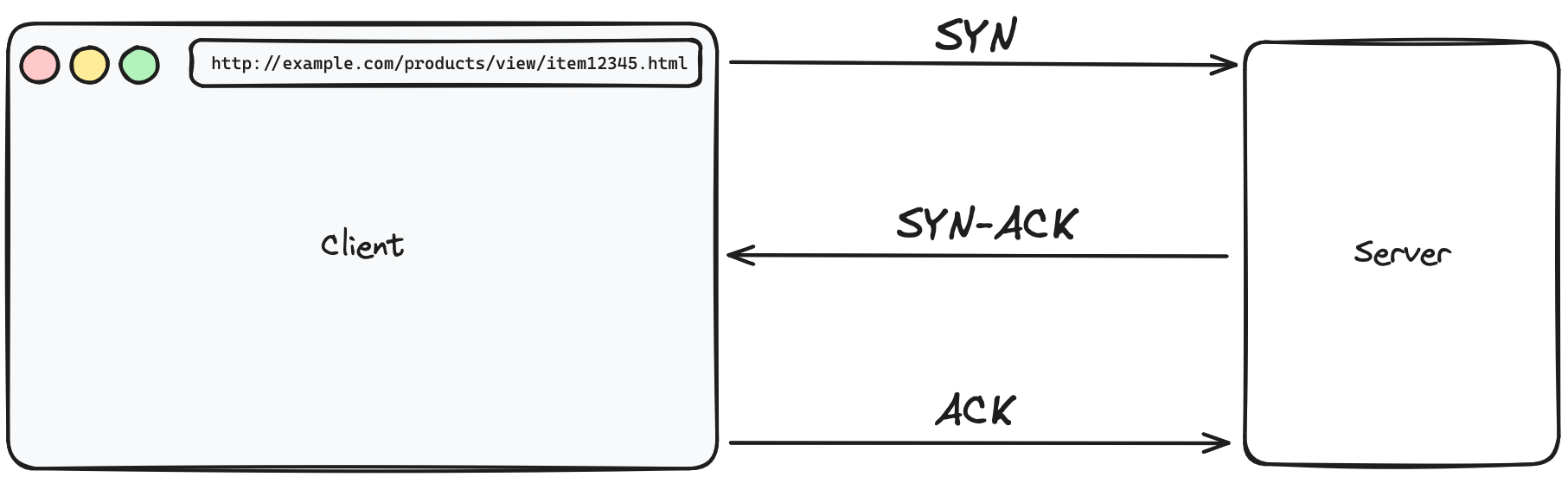
Through the TCP handshake, your browser and the server agree on the rules of data exchange, setting the stage for a smooth and reliable transfer of the web page data you've requested.
The Exchange: HTTP Request and Response
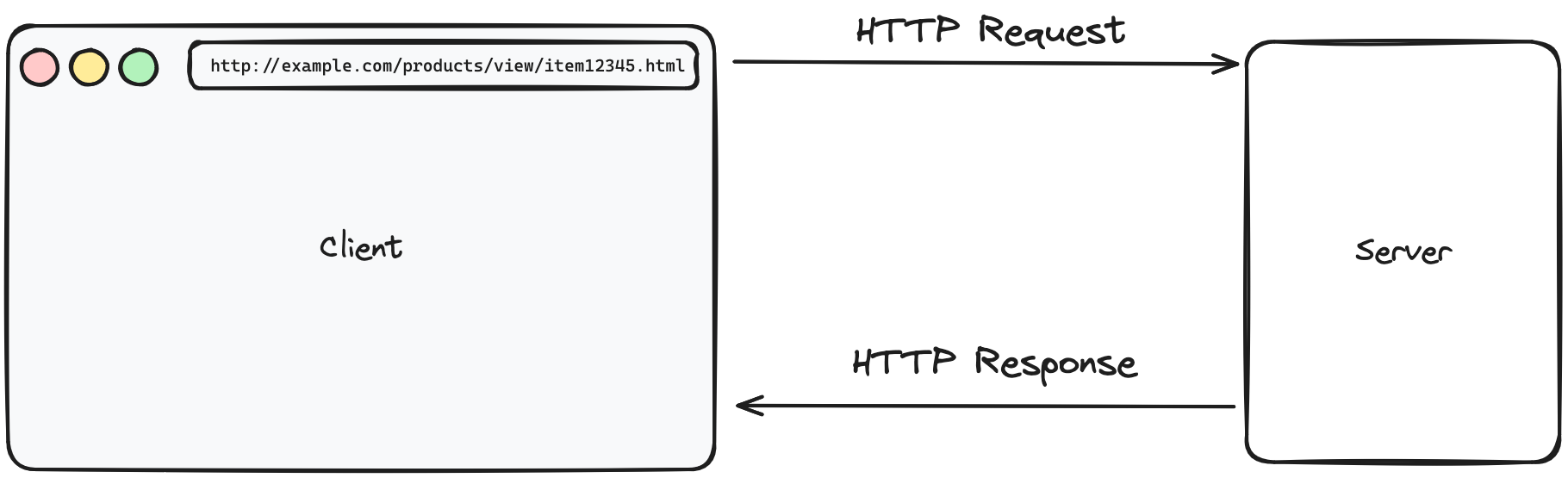
Once the browser establishes a connection with the server, it initiates an exchange of data. This exchange starts with the browser sending an HTTP request, and the server responding with the requested resource or information.
Initiating the Request:
- The browser sends an HTTP request to the server for the desired resource. This request looks something like this:
GET /products/view/item12345.html HTTP/1.1
Host: example.com
In this request:
- GET is the HTTP method used, indicating that the browser wants to retrieve data.
- /products/view/item12345.html is the path to the specific resource on the server.
- HTTP/1.1 specifies the version of the HTTP protocol being used.
- Host: example.com indicates the domain name of the server.
Receiving the Response:
Upon receiving the request, the server processes it and sends back an HTTP response. A successful response will include the requested resource, usually in the form of an HTML document:
HTTP/1.1 200 OK
Content-Type: text/html; charset=utf-8

<!DOCTYPE html>
<html lang="en">
...
</html>
In this response:
- HTTP/1.1 200 OK is the status line, where 200 OK indicates a successful response.
- Content-Type: text/html; charset=utf-8 specifies the media type and character encoding of the response.
- The HTML document follows, which the browser will render for the user.
The Grand Reveal: Rendering the Webpage
Upon receiving the HTML content, the browser begins the rendering process. It constructs the DOM, applies CSS styles, executes JavaScript, and loads additional resources as needed, such as images and fonts.
Variations in the Process
While the described sequence is typical, variations can occur due to user settings and environmental factors:
- Custom DNS Settings: Users utilizing DNS over HTTPS or other DNS services may experience different DNS lookup mechanisms.
- Privacy-Focused Browsers: Browsers with enhanced privacy features might handle data caching and connections in unique ways to minimize user tracking.
- Network and Server Factors: Variabilities in network conditions and server configurations can influence webpage loading times and resource availability.
- Browser Capabilities: Different browsers may render the same webpage slightly differently due to their unique rendering engines and supported technologies.
In conclusion, understanding the transformation of a URL into a webpage is more than technical knowledge; it's a glimpse into the complex mechanics of the internet. This understanding is crucial for all web users and highlights the continuous evolution in web technologies. As these technologies advance, they promise to further refine and secure our online browsing experience, keeping us seamlessly connected in an ever-evolving digital world.